Mobile EHR for on the go.
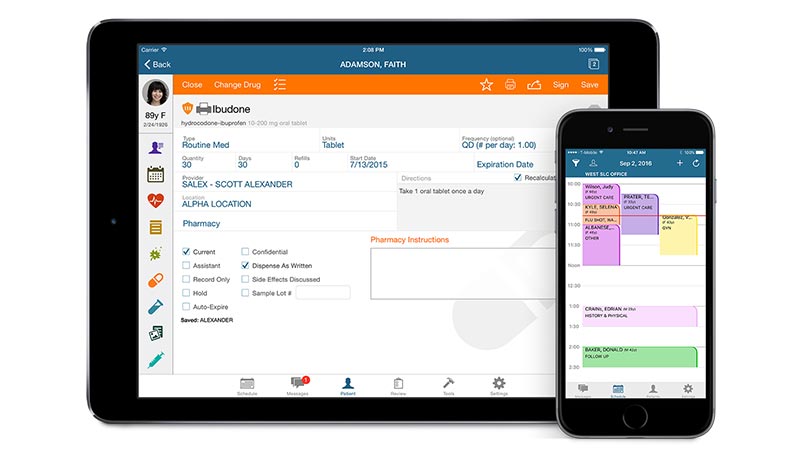
Be HIPAA compliant and mobile at the point of care with our medical record app that gives you untethered access to all your practice data in a secure environment.


Be HIPAA compliant and mobile at the point of care with our medical record app that gives you untethered access to all your practice data in a secure environment.
Manage your time. See provider or full facility schedules or update availability statuses.
Access a list of your pending tasks so you can prioritize, organize and plan your time.
Manage refill orders or renewal requests and transmit scrips with a click.
One word: freedom. The AdvancedMD clinical app helps you stay in touch without having to stay at the office. Take your practice with you and start treating, scheduling and managing on your own terms, when and where you choose. It’s the smart, secure way to gain more latitude, more time and more convenience. Best of all, AdvancedMD gives you a HIPAA secure and compliant environment.

AdvancedMD clinical app is free with AdvancedMD EHR, the industry-leading EHR system. Our EHR also features ePrescribing, immunization reporting and specialty templates that are designed to improve clinical outcomes. We help you chart, capture data & report without a single piece of paper. Industry-leading security create a safe, HIPAA-compliant way to manage patient data on the go.
For even more flexibility, choose the AdvancedMD Rhythm suite. It’s the only comprehensive medical software platform that integrates the EHR with our patient experience and medical billing systems. Put some Rhythm in your practice and see how a single, seamless system helps you drive efficiency, revenue and referrals.
Rhythm Workflow Features |
Desktop |
Mobile |
|---|---|---|
| Create New Patients | ||
| Manage Schedules | ||
| Message Staff & Patients | ||
| Allergy On-demand Video Training | ||
| Manage Rooming | ||
| Import Histories | ||
| Speech-to-text Dictation | ||
| Document Encounter | ||
| Create Subnotes | ||
| Capture Charges | ||
| Capture & View Documents | ||
| Manage Prescriptions | ||
| Prescribe Controlled Substances | ||
| Order Labs & Review Results | ||
| Manage Allergy Lists | ||
| Manage Problem Lists | ||
| Clinical Decision Support | ||
| Manage Patient Education | ||
| Manage Immunizations | ||
| Graph Growth Charts | ||
| Host Telemedicine Visits | ||
| Smart Dashboard | Coming Soon | |
| Review Bin | iPad only |