
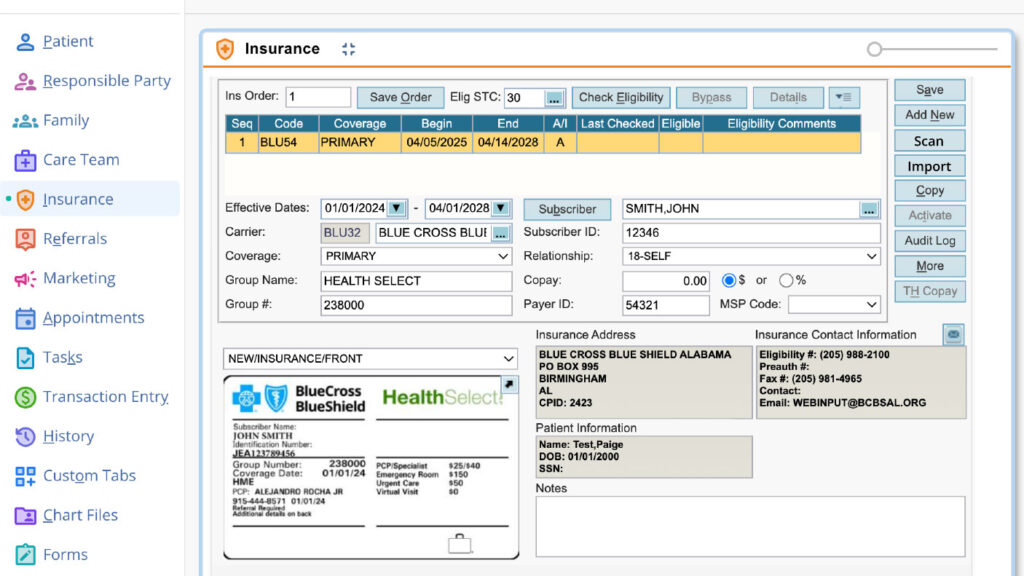
Inside the chart files, select scan or import. If an insurance card is selected the OCR process runs automatically and populates the corresponding fields. The insurance card image is visible, helping you verify accuracy.
Artificial Intelligence in Healthcare
We are working to empower smarter care. Our AI strategy is focused on delivering intelligent tools that may enhance efficiency, elevate the user experience, drive quality outcomes–aiming to fuel growth through data-driven insights and automation.

Increase Automation with AI Clinical Assistant
AI Clinical Assistant is a thoughtfully designed, unified suite of tools designed to automate manual processes, help reduce administrative burden, enhance quality of care, and fit into your workflow. At a time when clinicians typically spend more time documenting than delivering care, our AI Clinical Assistant brings focus back to what matters most: your patients. And you’re able to take back your pajama time.
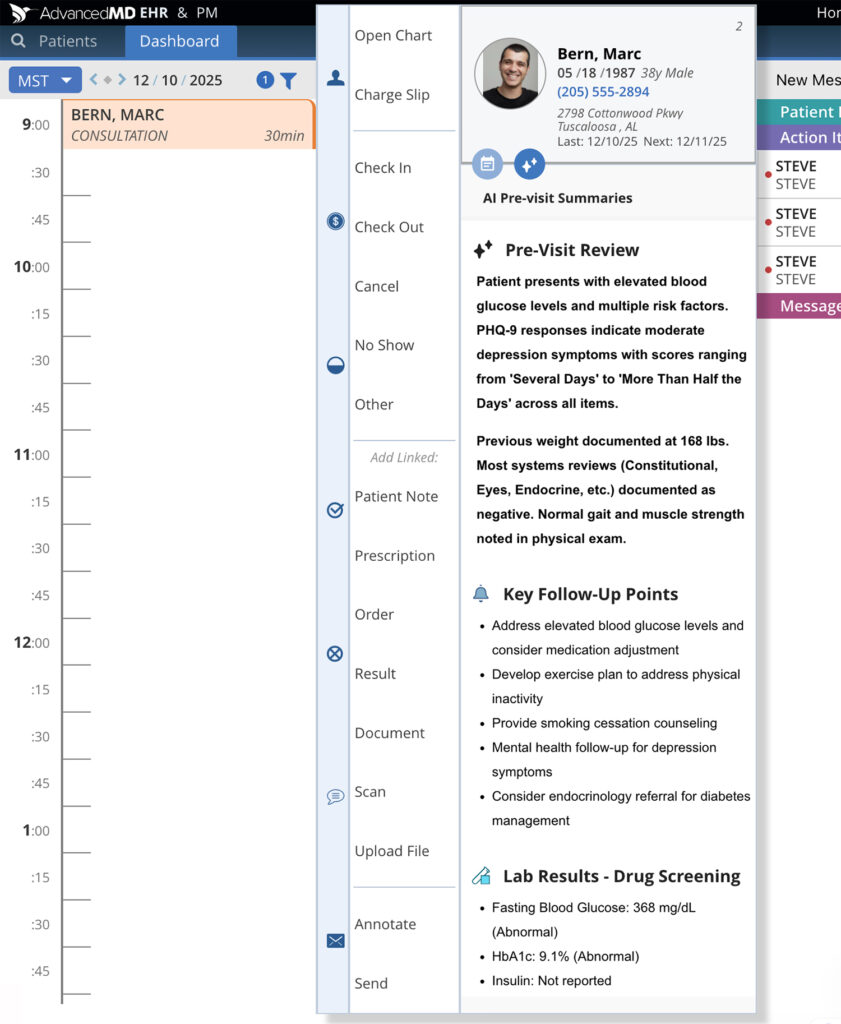
AI-assisted Pre-visit Summary
Generate Pre-visit Summaries using AI Clinical Assistant. Experience a clear, concise view of the patient’s recent medical history—before the appointment. By pulling together notes, labs, medications, allergies, and risk factors, this feature helps clinicians better focus on delivering informed, personalized care. Summaries can be generated from the Timeline view or the EHR Single-column Scheduler. After the Pre-visit Summary is generated, you can regenerate once (if needed).
Ambient Listening & Transcription
Ambient listening and scribing that automatically creates documentation. When enabled, during the visit, AI transcription captures your natural conversation. You’re always in control and can record, pause, or stop recording at any time. Our AI Clinical Assistant uses ambient listening coupled with a leading medical dictionary designed to understand medical language. AI filters speech for relevancy and speaker changes. Ambient Listening and Transcription is currently available for in-office desktop and telehealth visits. Available for mobile mid-2026.
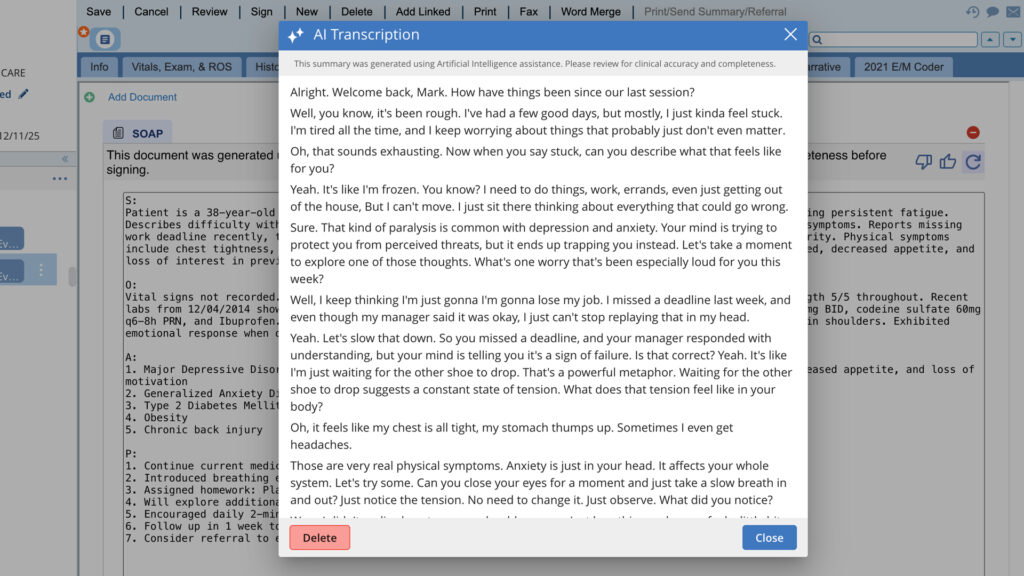
After the visit ends, choose to have AI generate your transcript into any of
the five full-dynamic note formats.
Shareable Visit Summary
SOAP
Psychiatric Evaluation
Medication Management
Treatment Plan
Once the document is generated, you can regenerate once (if needed).
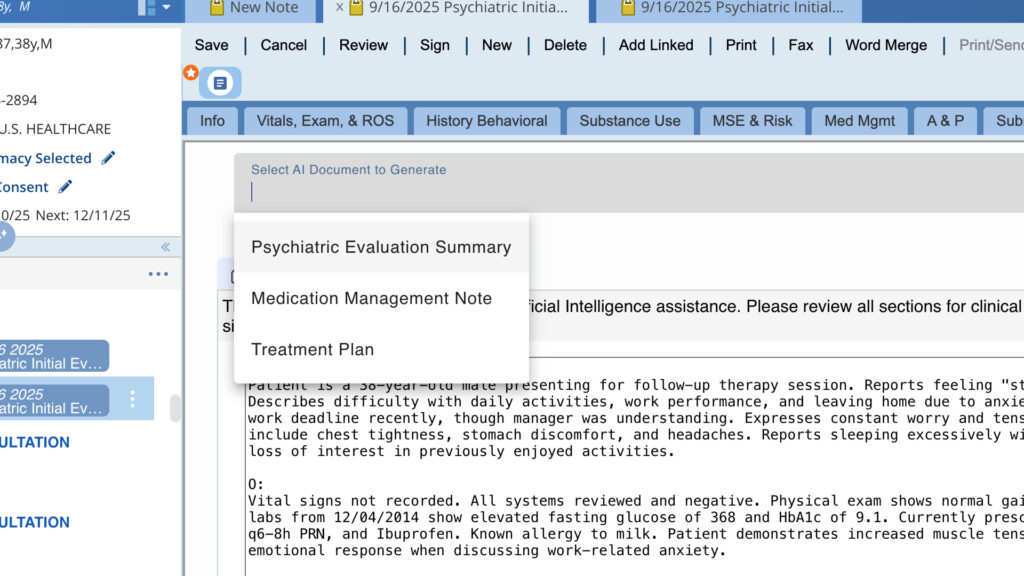
Quickly review the note, make needed edits & sign.
What used to take up to 15 minutes can now take just a few moments. Documentation becomes automated on our high-performing platform at a low cost that may generate immediate ROI.
AI Clinical Assistant is available for desktop. Coming soon for mobile, and telehealth. Pre-order today for this expanded functionality.
AI Clinical Assistant Action Items
Order today to adopt this next-level feature.
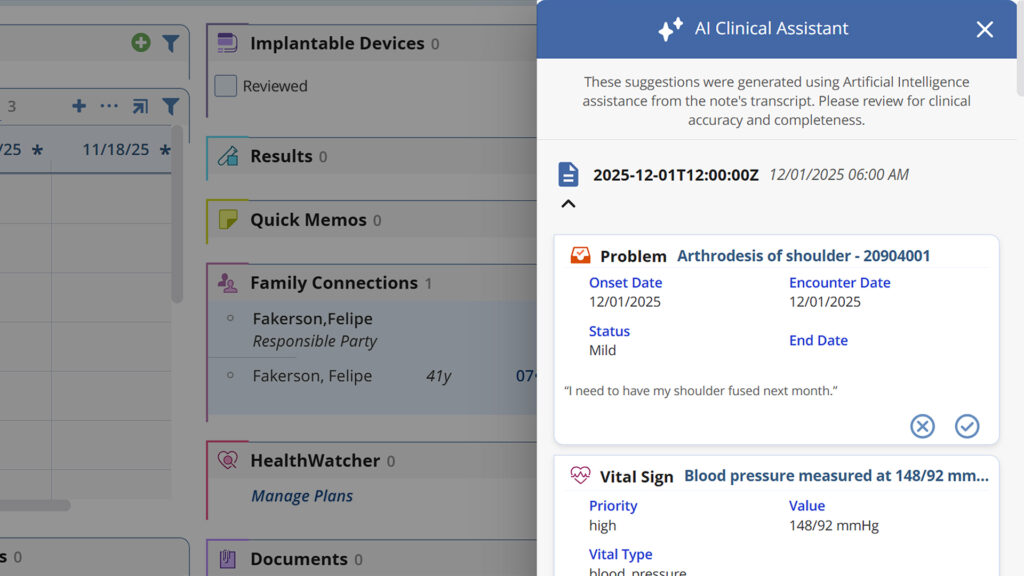
AI Clinical Assistant also analyzes your visit transcript and generates suggested action items for the patient chart, reducing manual data entry during or after each visit.
Action items include problems, medical histories, allergies, medications, and lab orders. Action items are currently available for in-office desktop and telehealth visits. Available for mobile mid-2026.
Automate Patient Intake of Insurance Cards in
Practice Management & Patient Engagement
AI facilitates a smooth insurance capture process. Scan and import insurance card images directly into the patient’s chart. You can also capture details from images submitted by patients. AI populates related details, including matching available carrier and subscriber records. If the image is missing information or multiple options exist, you can edit the record on the spot. Captured data includes:
- Effective Start Date
- Carrier
- Subscriber
- Subscriber ID
- Group Name
- Group Number

Practice Management
Patient-uploaded Insurance
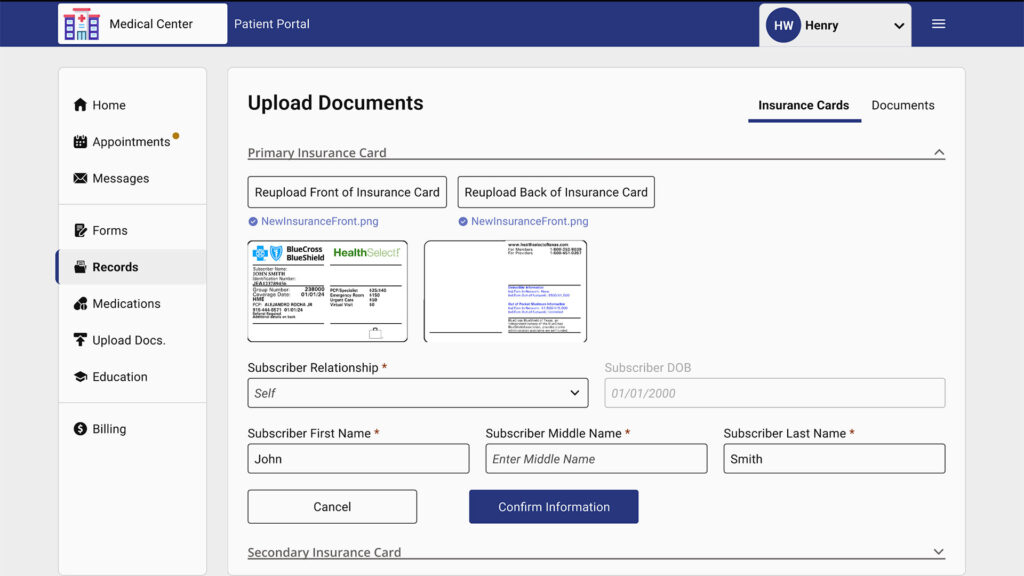
Patients upload insurance cards through the intake, online scheduling, telehealth workflows as well as inside the patient portal. Patients are prompted to choose the type of insurance card coverage (primary, secondary, or tertiary) and then upload front and back images of the card. After cards are uploaded, patients confirm subscriber information.
Insurance Card Worklist
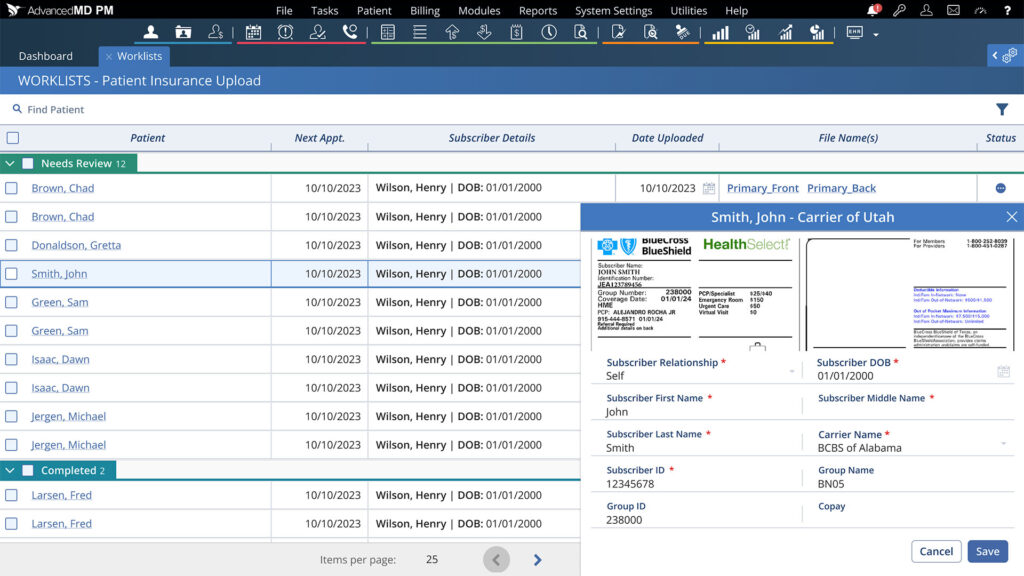
After insurance cards are uploaded, they can be managed on the worklist. Single or bulk actions can be taken to approve or deny coverage.
Choose a record, enter the correct carrier, verify all data mapped correctly, and save.
AI FAQs
Unable to find an answer you’re looking for? No problem. Chat with a live person and we’ll work to get your question answered.
Will the AI replace provider judgment?
No. AI only assists in summarizing drafted documentation. Providers review, edit and approve all content before signing.
Can documents be shared with patients and other providers?
Yes. New bookmarks are being provided to include in your narrative documents to enable sharing the data as needed.
How secure is AI-generated content in EHR notes for sharable visit summaries, medication management, and SOAP?
All AI processing is done securely in AdvancedMD EHR. No patient data is used for any model training.
Can I customize the documents?
Yes. Summaries can be edited, and we plan to offer additional document types in future versions
How will I know if patients upload new insurance cards?
The Insurance Card Worklist shows all new patient insurance card uploads. From here you can review, choose carrier, and approve or deny coverage.
Do I need to verify the information populated?
While the AI model can pull in data with high accuracy, it is recommended to verify the fields map correctly.
Request a Live Demo
Complete the form below for a live demo to see all that AdvancedMD has to offer.